MarginNote 5
🩺 MarginNote · for medical students

Keep your textbooks where you can use them later.

What medical students and residents typically do with MarginNote: pull the same system's content from internal med, surgery, imaging, and pharm into one mind map; link question-bank misses back to the textbook paragraph; turn highlights into reviewable cards as you read. If you already use Anki, you don't have to switch — MN and Anki round-trip via apkg.

"I am currently in my medical residency, needing to cover multiple text books for each field of studying. With MarginNote, I load up multiple textbooks, can search all of them and make an outline and add notes and excerpts from all of those textbooks, all in one place."
— Tree Planter Nextdoor · Medical Resident · US App Store · 2020-09 · ★★★★★
First Aid Robbins BRS series Sketchy / Pixorize UWorld crosslinks
Anki users
start here
FSRS-native scheduling apkg in / apkg out AnKing keeps working Image occlusion built in

Below are the four things medical users typically do in MarginNote — each with a concrete example.

For where MN fits around Anki specifically, see vs Anki →

From textbook reading to flashcards, in one workflow.

01 · Card making

Highlight Robbins. The card is already there.

The cost of "self-made cards" drops to one motion: select on a PDF, the card is generated. Five highlight colors map to five card types. Cloze and image-occlusion both happen on the original page — no Anki plugin install required. Export to apkg whenever you want; AnKing decks can be brought in to layer alongside.

  • Five color-coded highlight types — definition, mechanism, clinical pearl, buzzword, image-occlusion.
  • Cloze directly on PDF — select a phrase, the back of the card is the original page.
  • Tag inheritance from book structure — system, chapter, sub-section already attached.
  • Bidirectional apkg — pull cards into Anki, or pull AnKing in to layer your own.
Robbins · Ch. 4 · Inflammation

Acute inflammation cardinal signs: rubor, tumor, calor, dolor, and functio laesa. Key mediator early phase: histamine from mast cells.

Five cardinal signs of acute inflammation?
auto-card · highlightdue in 3d
Key mediator of early-phase acute inflammation?
auto-card · highlightdue in 8d
02 · Multi-book scheduling

First Aid, Robbins, UWorld in one queue.

Select cards from your textbooks for spaced repetition, then use your course and exam plans to decide what to focus on. The excerpts you organized remain available in the map and at their original source.

  • Add-once → auto-schedule across books, no per-card priority needed.
  • Choose your review scope — decide which material needs long-term spacing and which can stay as reference notes.
  • Deadline-aware — Step 1 date drives proximity weighting in the final 8 weeks.
Review example · material from several sources
First Aid · Cardio · myocardial action potential phases
p=0.92 · weak spotdue now
UWorld block 14 · Renal · FeNa interpretation
p=0.88 · missed 3×due now
Robbins · Ch. 4 · histamine release sequence
p=0.61 · auto-postponed +2dtomorrow
BRS Phys · acid-base disturbance compensation
p=0.42 · light-trackin 12d
03 · Light-track recall (no SRS queue)

Some recall doesn't have to enter the queue.

Not everything you want to remember belongs in the SRS queue — tomorrow's quiz, an attending's pimping question, anatomy you'll see again next block. Putting them all in Anki just compounds daily review load. MN ships several light-track recall mechanisms that don't enter the FSRS queue and don't add to your daily count.

  • Mind-map node folding — collapse to title, recall the children, expand to verify.
  • Highlight blanking — toggle highlights to invisible for self-test, select to restore them.
  • Rectangle & highlighter occlusion with recall mode — useful for diagrams without making image-occlusion cards.
  • Handwriting layer hide/show — write what you remember, reveal what you wrote earlier.
Why this matters specifically for med school. A typical USMLE Step 1 deck reaches 10,000+ mature cards by dedicated. Even a small percentage that don't actually need long-term spacing — anatomy you'll see again next block, tomorrow's quiz, an attending's pimping question — compounds into hours of daily review. Light-track recall is where they go.
Endocrine · light-track self-test
► Hypothalamus (select to expand · 4 children)
► Pituitary (select to expand · 6 children · folded since 2 hr ago)
▼ Adrenal cortex
— glomerulosa: aldosterone
— fasciculata: cortisol
— reticularis: DHEA
↳ no card scheduled · no SRS impact · 0 added to today's queue
04 · Cards stay attached to source

Cards live on a four-level ladder.

Reviewing a card alongside its surrounding chunk usually recalls more than reviewing it in isolation. MN keeps every card linked to book → chapter → mind-map node → source paragraph. During review you can stay zoomed-in on the card, or zoom out to the surrounding context that originally encoded it.

  • One-tap source preview — see the original paragraph without leaving review.
  • Block review — define a third-level mind-map branch as a single review unit; the whole branch is one item, not eight cards.
  • Tag-bound chunks — review a tag (e.g. #renal #weak) as a single contextualized session.
Card under review · with 4-level chain visible
BOOK Robbins, Pathologic Basis of Disease, 11ed
CH Ch. 4 · Hemodynamic Disorders
NODE Mind-map: Edema → mechanisms
PARA p. 122, ¶3
Three mechanisms of edema?

Real MN5 sample views

Review a concept. Compare its sources.

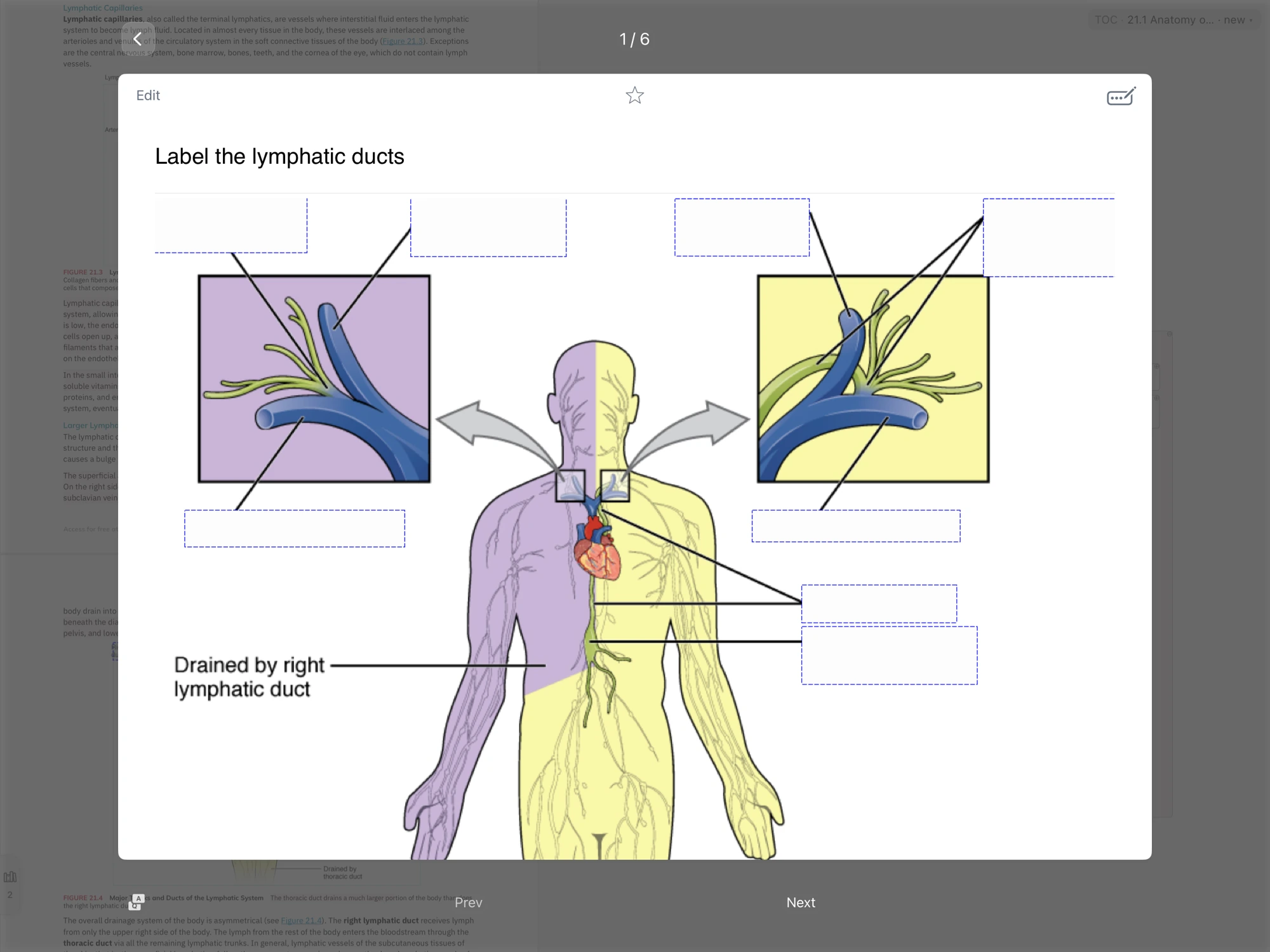
Medical study sample: a cloze review card
Recall a key point before revealing the answer.
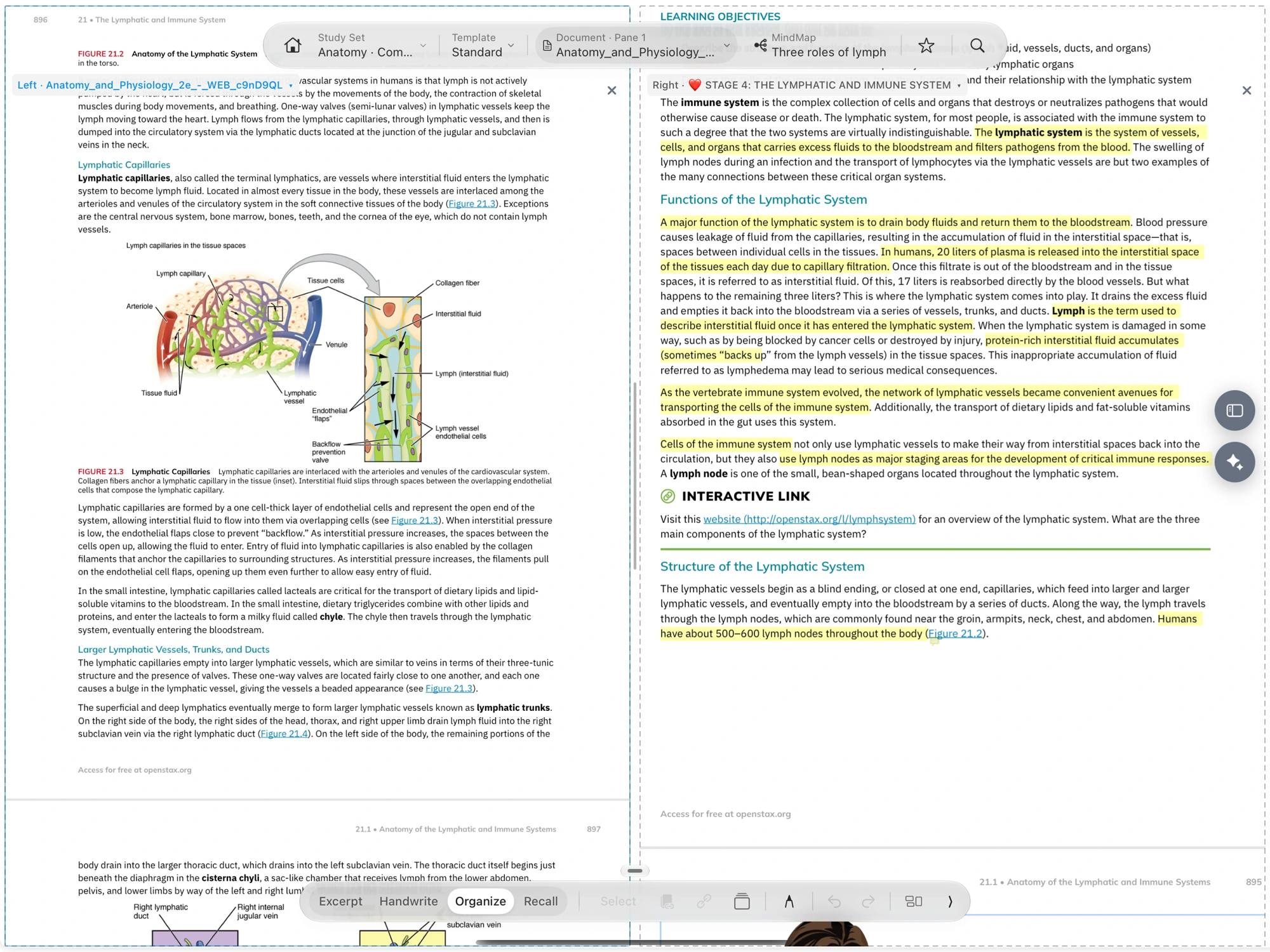
Medical study sample: two documents and a mind map
Compare two sources with your notes in view.

Real MN5 review and dual-document views from the verified screenshot sample set. These are product examples, not the quoted community author’s original work.

A physician on what changed.

"Throughout medical school and residency I was constantly looking for a program that let me upload electronic textbooks to highlight and annotate with easy referencing. I tried everything, Goodnotes, Onenote, Evernote - you name it I tried it, and while they all worked fine/ok for annotation and highlighting, they all struggled when it came to reviewing what I'd already gone over. Once I found MarginNote I was hooked."

J
JMayYXE · ★★★★★
Physician · Canadian App Store · Apr 14, 2022
Verbatim from App Store review titled "Best Note Taking Software Period - Physician Approved!" · MarginNote 3 (Mac) · review_id 280893313767LEKQwcqOb0XOzuW__JyTczA

What med students ask before switching.

Should I abandon AnKing?
No, and we don't want you to. AnKing is the result of a decade of crowdsourced refinement on one specific problem — Wozniak's "scheduling" layer. MarginNote handles the layers around it: getting cards out of textbook reading without retyping, holding multi-book priority, and giving lighter material a non-SRS recall path. Most med-student users we've heard from run both. Export from MarginNote in apkg, layer alongside your AnKing deck.
Is FSRS in MarginNote the same as in Anki?
Same algorithm family — FSRS is open-source and benchmarked publicly by Jarrett Ye and the open-spaced-repetition project on a corpus of 1.7 billion reviews from ~20,000 Anki users (paper accepted at ACM SIGKDD). MarginNote ships FSRS as the default scheduler. Your existing FSRS-tuned parameters from Anki are not portable, but the behavior and predictions are equivalent.
Doesn't FSRS already solve "ease hell" / pile-up?
FSRS solves the algorithmic side of pile-up — the part where SM-2 over-penalized lapses and made intervals collapse. It does not solve the structural side: when 30% of your "must remember" items don't actually need long-term spacing, you've still over-loaded your queue regardless of algorithm. Light-track recall (Gap 3) is the structural fix — reserving the SRS queue for items that genuinely need long-term spacing.
Image occlusion for Netter plates — same as the Anki add-on?
Same mechanics: rectangles you draw, revealed one at a time. Built in, not a plugin. Round-trips to Anki via apkg work for most cases; very complex Anki occlusion templates may need testing first.
Can I use it on iPad during a lecture?
Yes — Apple Pencil handwritten annotations on the lecture PDF are searchable. Most users do reading and card-creation on Mac, light-track review on iPad in coffee-shop mode.
Does MarginNote have a Step 1 community deck?
No, and we don't think we should compete with AnKing on that. AnKing is the right tool for "comprehensive shared deck I can grind." MarginNote is the right tool for "the chapter I'm reading right now turning into my own cards as I read it." The two roles don't overlap.

Read the textbook.
Let the textbook schedule itself.

Free 14-day trial. macOS and iPadOS. FSRS-native. apkg in/out. Your AnKing deck still works.